Why your IT provider may recommend replacing equipment that still works
Legitimate reasons a provider may want to replace working network equipment, and the questions worth asking before a business approves the cost.
A business can have a network that is working and still receive a recommendation to replace part of it. The firewall passes traffic. The switches connect the office. People can reach email, files, and the applications they use. Then a proposal arrives for new equipment, often with installation, licensing, and a change to how the environment is managed.
The natural question is why working equipment needs to be replaced. Sometimes the honest answer is that it does not, at least not yet. Sometimes the equipment is closer to a problem than it looks, because support has ended, updates have stopped, or it no longer matches how the business operates. Both can be true of different devices in the same quote.
A provider’s recommendation is not automatically a sales tactic, and it is not automatically a requirement. It is a proposal. The useful work is to separate the technical reason, the operational reason, and the cost before the purchase is approved.
Why IT providers standardize equipment
Managed IT providers usually support many small businesses with a small group of technicians. They cannot be equally fluent in every firewall, switch, wireless system, and backup product on the market. Most providers therefore settle on a short list of manufacturers, software platforms, and management tools.
That preference has practical benefits. Technicians learn the failure modes of the products they see every week. Troubleshooting is faster when the menus, logs, and vendor support process are familiar. Security settings can be applied consistently instead of being reinvented at each customer. Centralized administration makes it easier to see a missed update, a failed backup, or a device that has gone offline. Spare parts, licenses, and maintenance follow a pattern, so the environment is less of a one-off.
Those benefits can improve the service the business receives. A standardized firewall the provider knows how to monitor, update, and replace is sometimes a better operational choice than an unusual device that only one former technician understood. A recommendation to replace working equipment may be an attempt to bring the business onto a platform the provider can support properly.
“This is what we install” is a starting point. The fuller explanation is which problems the standard platform solves, and which of those problems the business actually has.
When standardization may not be the best immediate choice
A standard replacement can still be the wrong project to approve this quarter. The new design may be sound and also larger than the need. It may replace several devices when only one of them is unsupported. It may move the business to a licensing model with a higher ongoing cost. It may require a cutover that interrupts operations more than the current risk justifies.
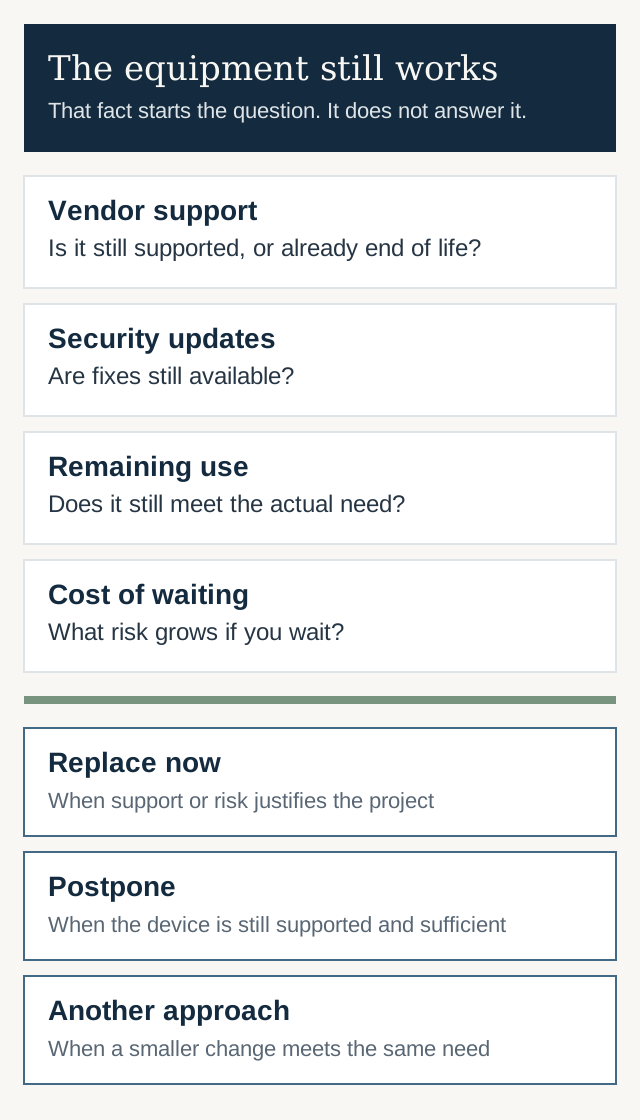
The comparison is the proposed project against the business’s actual requirements. Look at what the existing equipment can still do, whether the vendor still supports it, and whether security updates are available. Performance matters if the office has outgrown the device, not merely because a newer model exists. Compatibility matters if phones, a line-of-business application, or remote access depend on the current setup. Maintenance cost cuts both ways: an older device can become expensive in emergency labor, and a new platform can become expensive in licenses. Migration has risk of its own. A cutover can fail, or a missed setting can turn a “simple replacement” into a longer outage.
Remaining useful life belongs in the same conversation. A device that is supported, updated, and adequate may still have reasonable service left. A device that powers on but no longer receives fixes does not earn a reprieve only because nobody has noticed a failure yet.
Do not keep unsupported or insecure equipment only because it still functions. The point of slowing down is to match the project to the risk, not to postpone a replacement the business already needs.
The financial considerations
Equipment recommendations are also commercial. A provider may earn revenue from the sale of the hardware, from licensing, from the installation project, from the management tools used to administer it, and from the ongoing support agreement that follows. That is a normal part of how IT services businesses operate. It does not mean the recommendation is dishonest. A provider can believe the replacement is the right operational choice and also benefit if you approve it.
The customer’s job is to understand the complete costs and benefits, not to assume bad faith. Ask what is purchased once, what will be billed every year, and what labor is included. Ask whether the quote replaces only the device that has a problem or also refreshes neighboring equipment so the provider can support one generation of products.
A lower price is not automatically better. The cheapest path may leave a device nobody can patch. A higher price is not automatically justified either. The proposal should name the operational result being bought: continued vendor support, a configuration someone can monitor, or a capacity problem the business is actually feeling.
Questions to ask before approving a replacement
A short list is enough to change the conversation from a yes-or-no quote into a decision:
- What problem is the replacement intended to solve?
- Is the existing equipment still supported by the vendor?
- Are security updates still available?
- What happens if the replacement is postponed for six or twelve months?
- Are there alternative approaches, including replacing only part of what was quoted?
- What are the installation costs, and what are the ongoing license or support costs?
- How will the change affect day-to-day maintenance and who is responsible for it?
- What could go wrong during the cutover, and how would the business get back to a working state?
The answers should be specific to this network. A rule such as “replace everything older than five years” may be a sensible internal standard and still be broader than this business needs to fund now. If a device is unsupported, say what that means: no patches, no vendor assistance, no spare parts, or simply not on the provider’s standard list. Those are different facts.
Making an informed decision
The better choice depends on the business’s requirements, the actual risk, the budget, and the arrangements for ongoing support. A standardized replacement is often appropriate when the current platform is unsupported, unfamiliar to the people who must maintain it, or no longer able to do the job. An alternative deserves consideration when the quote is really a refresh of equipment that is still supported and still sufficient, or when a smaller change would remove the stated risk.
There is no general rule that working equipment should be kept, and no general rule that a provider’s standard design should be accepted in full. The goal is to understand the tradeoffs well enough to approve, revise, or defer the project on purpose.
If a proposal is large enough that you want that review before you commit, an IT proposal review is one way to do it. A review will not always find a less expensive option. Sometimes the recommendation is the right one, and the value of the review is knowing why.